Employee Monitoring Software That Keeps Your Team Productive, Accountable, and On Time

OneTracker is an all-in-one employee time tracking software and productivity monitoring platform built for in-office and remote teams. Track activity, attendance, and screenshots - all from one dashboard.
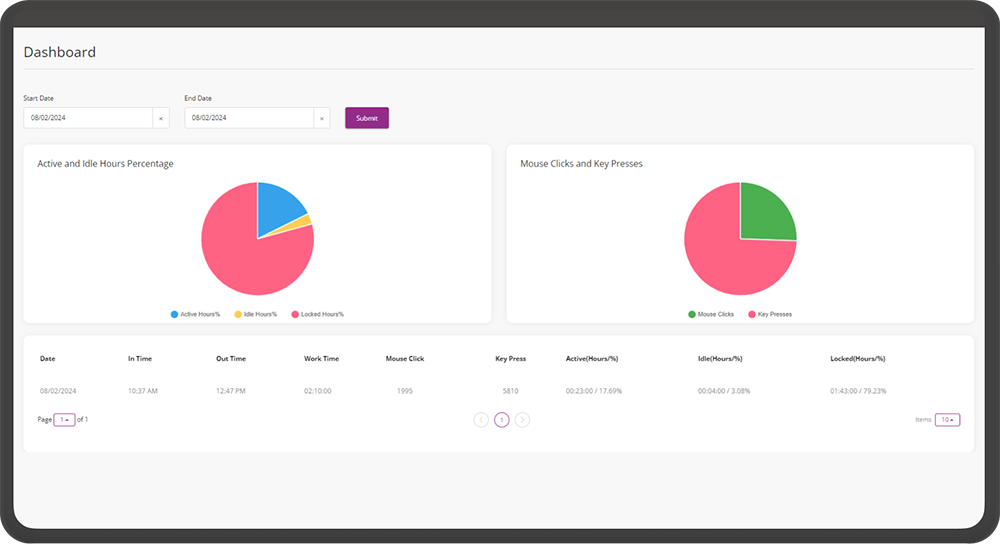
What is OneTracker?

OneTracker is a complete employee tracking software solution that combines productivity monitoring, attendance management, and workforce analytics in a single platform. Whether your team works from the office or remotely, OneTracker gives managers real visibility into how work actually gets done, without micromanaging.

As a trusted remote employee monitoring software, OneTracker helps distributed teams stay aligned, accountable, and productive, no matter where they log in from.

Workforce Visibility & Analytics

Empower your team with transparent monitoring that builds trust, drives efficiency, and keeps everyone aligned.

Core Features

Productivity Tracking

Get a clear, data-backed view of how your team spends their working hours.

  • Mouse click and keyboard activity tracking
  • Active time and idle time monitoring
  • Productive vs. unproductive time reporting
  • User activity analytics
  • Average productivity score calculations

As a complete employee productivity software, OneTracker turns raw activity data into actionable insight. Helping you spot bottlenecks and recognize your top performers.

Screenshot Monitoring

See exactly what's happening during work hours with automatic, periodic screenshots.

  • Employee activity screenshots captured automatically
  • Built-in screenshot viewing interface for employees, for full transparency

OneTracker functions as a reliable screenshot monitor, giving managers visibility while keeping the process transparent for employees. A balanced approach to employee surveillance software that builds trust instead of eroding it.

Attendance Management

Replace manual attendance registers with automated, accurate tracking.

  • Automated attendance tracking and reporting
  • One-click attendance exports to Excel
  • Full-day, half-day, and absent-day calculations
  • Attendance based on configurable shift policies
  • Manual attendance processing when needed

A dependable time tracking system that removes guesswork and paperwork from attendance management.

Working Shift Management

Configure shifts the way your business actually runs.

  • Custom shift start/end time configuration
  • Work flexibility counts
  • Break duration controls
  • Late login tracking

Built for businesses that need an online time tracking software that adapts to multiple shifts, flexible hours, and break policies - not the other way around.

Team Management

Manage performance and attendance at the team level, not just individually.

  • Team performance monitoring
  • Team attendance tracking
  • Team-wide productivity reporting

Perfect for managers who need a bird's-eye view across departments. Making OneTracker a practical employee work tracking software for multi-team organizations.

Reporting & Analytics

Turn raw activity into clear, exportable reports.

  • User activity, attendance, and productivity reports
  • Team performance reports
  • Manager dashboards
  • Status-based activity summaries
  • Overtime tracking
  • Late login and over-break tracking
  • Incomplete workday tracking

From daily stand-ups to monthly reviews, OneTracker's reporting suite makes it one of the most complete employee activity monitoring software options for data-driven teams.

Why Teams Choose OneTracker

For Remote & Hybrid Teams

As remote employee time tracking becomes a necessity, not a nice-to-have, OneTracker gives distributed teams the same visibility as an in-office setup. Attendance, activity, and productivity, tracked automatically, wherever your people are working from.

For Growing Businesses

Replace 3-4 disconnected tools with one platform. OneTracker combines time tracking, attendance, and productivity monitoring, reducing admin overhead as your team scales.

For Data-Driven Managers

Stop guessing who's overloaded, underutilized, or consistently late. OneTracker's dashboards and reports give you the numbers to make fair, informed decisions.

How It Works

1

Install & Configure

Set up shifts, break policies, and team structures in minutes.

2

Track Automatically

OneTracker runs in the background, capturing activity, attendance, and screenshots.

3

Review & Act

Use dashboards and exportable reports to spot trends, address issues, and recognize good work.

Built for Every Team

Productivity Tracker

for individual contributors

Employee Productivity Monitoring Tools

for team leads

Time Tracking Software with Screenshots

for finance and compliance teams

Manager Dashboards

for leadership visibility across the org

Trusted Across Industries

OneTracker works across sectors where workforce visibility and accurate time data actually matter, from fast-moving tech teams to highly regulated professional services.

What Our Clients Say

Real results from real teams using OneTracker

FAQ

Both. OneTracker combines employee time tracking software with productivity monitoring, attendance management, and screenshot capture. Giving you a complete picture, not just clocked hours.

Yes. OneTracker is built to work equally well for in-office, hybrid, and fully remote teams, making it a reliable remote employee monitoring software for distributed workforces.

Yes. OneTracker includes a screenshot viewing interface for employees, so monitoring stays transparent rather than one-sided.

Yes. Attendance reports export directly to Excel, and productivity/team reports are available through manager dashboards.

Yes. Shift start/end times, break durations, and work flexibility counts are all configurable per team or policy.

Get Started Today

Please fill out the form, and we will be in touch with you to learn more about your system and how OneTracker can help transform it for the better.


Get Full Visibility Into Your Team's Productivity

Join teams using OneTracker as their all-in-one employee tracking software for attendance, productivity, and performance insights.